Everything your novel needs.
Nothing it doesn't.
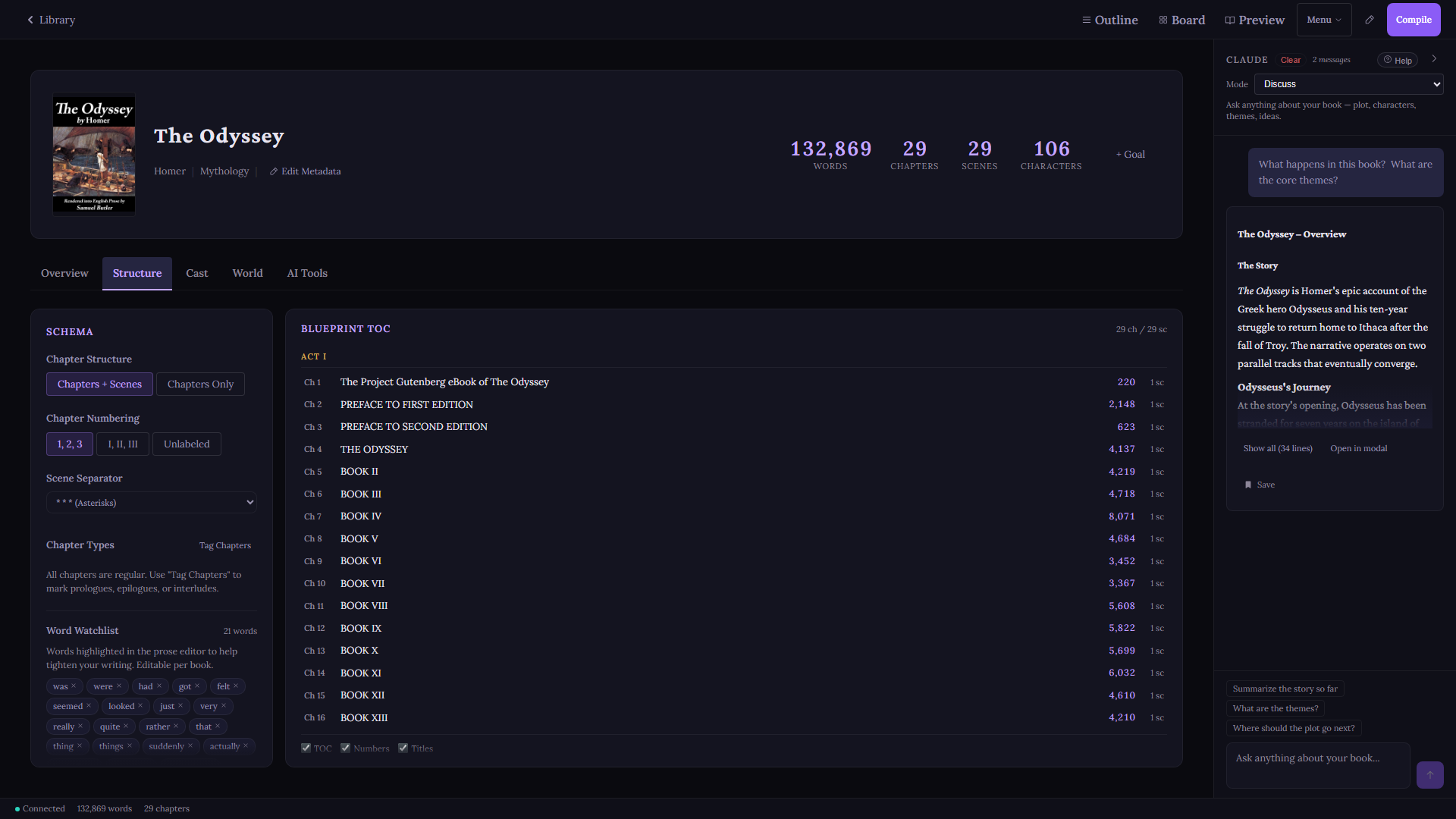
A complete manuscript studio built from the ground up for long-form fiction. Manuscript architecture, automatic character tracking, AI when you want it, local-first always.
What's Inside
Manuscript Studio
Editor, views, outlining
Characters & World
Auto-detection, world notes, RAG
AI Writing & Craft
5 modes, presets, power tools
Intelligence & V2
Living Grimoire, cost tracking
Import & Export
EPUB, DOCX, Scrivener
Manuscript Studioeditor, views, outlining
Structure without rigidity.
Your book, organized the way a book actually works. Not a folder full of documents. A living hierarchy of books, acts, chapters, and scenes that you can reshape at any point.
- Books - Acts - Chapters - Scenes hierarchy
- Drag and reorder anything, any time
- Track scene status (Draft, In Progress, Final)
- Scene synopsis and notes panel per scene
- Scene-level or chapter-level view, your choice
- Permanent delete with double confirmation (no accidental loss)
A clean page. Nothing in the way.
Rich text editing built for writers, not word processors. Auto-save, focus mode, and a distraction-free environment so you can think about the story. Not the software.
- Rich text formatting: bold, italic, alignment
- Auto-save every 1.5 seconds. Never lose a word.
- Focus mode: hide everything except the page
- Live word count per scene and per book
- Paste from any source cleanly
- Import DOCX and TXT files directly into scenes
- Scene purpose tags: Action, Dialogue, Exposition, Transition, Revelation, Emotional
- POV designation per scene, colour-coded across all views
Dead Words Filter
Toggle a panel in the toolbar to see your overused words (was, just, very, really, that, quite) with occurrence counts and colour-coded severity. Cut weak language before it reaches your editor.
Prose Editor View
Five ways to see your story.
Beyond the blank page.
Switch between views without leaving your book. Every view is always up to date. No separate planning app needed.
Manuscript Outline
A spreadsheet-style table of every scene across every chapter. Columns for Chapter, Scene Title, Word Count, Status, POV Character, Synopsis, and Tagged Characters. All columns sortable. Filter by text search or status.
Act separator headers when acts are enabled. Parallel data loading keeps it fast even on 50-plus scene books. Click any row to jump directly to that scene.
Visual Plot Board
Three views of the same story. Corkboard lays out index cards colour-coded by scene status or POV character, in three card sizes (compact, standard, expanded). Timeline arranges scenes chronologically across chapters. Characters groups scene cards by POV.
Group by Chapter, Act, Status, or show all ungrouped. Filter by chapter. Click any card to open that scene.
Split-Screen Editor
View reference material alongside your current scene. Options for the reference pane: scene notes, another scene from any chapter, character profiles, or the Story Bible. Useful for keeping continuity while you write forward.
Zen Mode
Full deep immersion. Hides the sidebar, AI panel, topbar, and path bar. Only the prose editor remains, centred on screen with generous padding. A floating word count overlay is the only UI element that stays.
Three visual themes. Press Ctrl+Shift+Z to enter, Esc to exit. A step beyond standard Focus mode, which keeps the topbar visible on hover.
Read-Only Preview
Your full manuscript rendered in reading order: all chapters, all scenes, concatenated with scene separators. Scrollable. Click a scene in the sidebar to jump directly to it in the preview. Font size controls. Compatible with Focus mode.
Characters & World Buildingscribing, bible, world notes
Your cast, always accounted for.
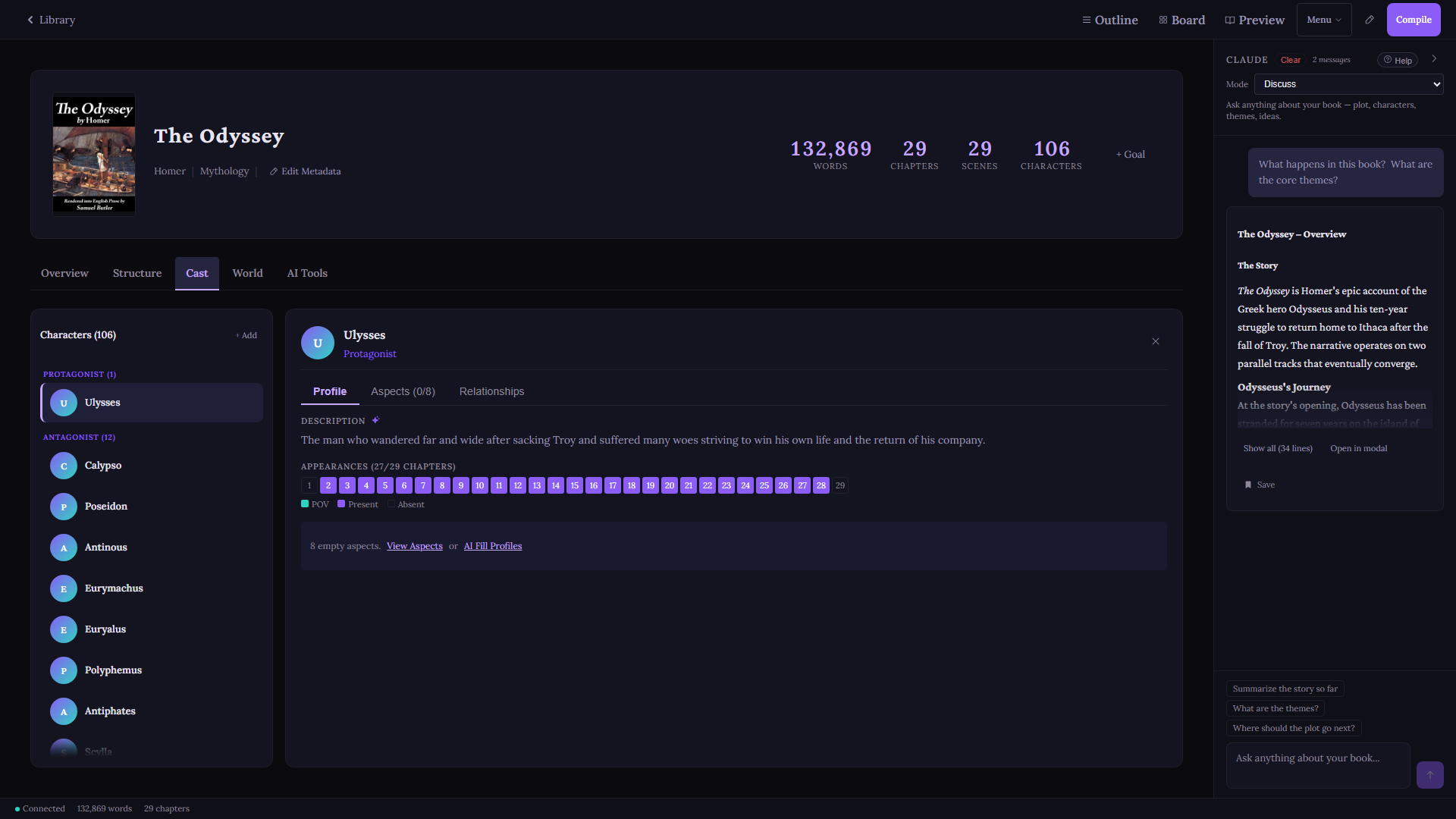
Write naturally. GrimoireScribe reads your prose as you write, detects characters and their aliases automatically, and tags them to every scene they appear in.
Continuity errors surface before your editor finds them. See exactly which scenes each character appears in, sorted by appearance order.
- Auto-detect characters from prose via AI scan
- Alias support: "Elara", "Voss", "the captain" all unified
- Scene tagging: every appearance tracked
- Appearances view: full scene list per character
- Character profiles: role, arc, notes, psychology, voice, inner life
- Add characters manually or accept AI suggestions
Relationship Map
Bidirectional relationship links between any two characters: ally, enemy, family, mentor. Both directions stored and surfaced. Build the social graph of your story without a separate tool.
Appearance Heatmap
A colour-coded chapter grid showing where each character appears across your manuscript. Spot gaps in a character arc, accidental absences, or crowd scenes at a glance.
AI Name Generator
Context-aware name generation with cultural filters: Fantasy, Nordic, Celtic, Arabic, Japanese, Greek, Slavic, and more. Phonetic avoidance of existing character names built in.
Every answer in one place.
The Story Bible is a browsable, read-only panel that surfaces the full knowledge index your AI backend has built from your manuscript. Five sections, always current.
- Characters: all profiles with descriptions, arcs, and appearance locations
- Chapters: AI-generated summaries of every chapter with key events
- Locations: every place mentioned across your manuscript
- World: your world notes and uploaded documents
- Timeline: chronological event listing across the full story
Filter by section. Search within. Counts shown in every filter button. The Story Bible is the reader-facing view of the knowledge index that powers every AI call.
Your lore, always in context.
Upload world documents (lore bibles, maps, timelines, histories) and GrimoireScribe retrieves only what's relevant to the scene you're writing.
No more pasting your entire world bible into every prompt. Retrieval surfaces the right notes automatically, in context, every time. Keyword search works locally out of the box. Semantic search is available through optional cloud or local embedding models.
- Rich text notes per world topic
- Upload .txt, .md, .pdf, .docx, .rtf documents
- Keyword retrieval built in, works fully offline
- Optional semantic search via cloud or local embeddings
- All notes stored locally. Nothing on our servers.
Voyage AI Semantic Retrieval
Optional upgrade: Voyage AI embeds your world documents into vector space using voyage-4-lite (free tier: 200M tokens/month). At query time, cosine similarity ranking selects the most relevant passages from your lore. Falls back to keyword scoring when Voyage is not configured. Bring your own API key.
AI Writing & Craft5 modes, presets, power tools
Five modes. All context-aware.
All human-in-the-loop.
Every AI request automatically injects your book summary, writing style guide, character profiles, relevant world notes, and the prior scene. You ask the question. GrimoireScribe assembles the context.
5 Writing Providers + Offline Mode.
Claude, GPT, Grok, Gemini, or Mistral for cloud writing. Local AI via Offline Mode for fully private, zero-cost operation. Configure a different model per mode. No GrimoireScribe credits. No markup. Ever.
No AI? No Problem.
Skip every API key. The full manuscript studio, character scribing, world building, and export all work completely offline. AI is opt-in. Not a requirement.
Write Mode
Draft prose for a scene with your full manuscript context pre-loaded. A starting point, not a final product. You decide what earns its place.
Edit Mode
Improve existing prose: tighten pacing, sharpen dialogue, cut adverbs, match your established voice. Line-level revision that knows how you write.
Chapter Mode
Generate a full chapter draft from a brief. Review scene by scene. Nothing is auto-inserted. Every paragraph waits for your approval.
Discuss Mode
Multi-turn conversation about your plot, characters, or structure. The AI has read your whole manuscript. Use that.
New Scene Mode
Describe what needs to happen and get a scene drafted from your synopsis. For when you know where you're going but the blank page won't budge.
Series Chat
Chat across every book in a series simultaneously. Full character lists and chapter context from every volume. Continuity errors don't hide.
Beyond generation.
Tools that think about your craft.
AI Describe / Sensory Expansion
Highlight any passage in your prose. Get back rich sensory alternatives: how the same moment smells, sounds, feels in the body, tastes, sits in peripheral vision. Concrete, not vague. Your voice, amplified.
Useful for first-draft passes that need grounding, and for revision sessions where a scene reads flat.
AI Brainstorm
A structured creative generator for the moments when the story stalls. Three output modes: plot twists that fit the logic of what you've already written, character secrets that recontextualise what the reader knows, and what-if scenarios for key decision points.
Every suggestion is grounded in your actual manuscript context, not generic creative writing advice.
Manuscript Continuity Checker
Run a full AI audit of your manuscript for timeline inconsistencies, character contradictions, plot holes, world-building errors, and voice shifts. Results are severity-rated so you know what actually needs attention before submission.
Catches the kind of errors a line editor finds on page 300 that traces back to a decision you made on page 12.
Story Structure Templates
Six structural frameworks applied as scaffolding when you create a new book: Hero's Journey, Three-Act, Save the Cat, Snowflake, Fichtean Curve, Seven-Point. Each creates placeholder chapters and scenes with structural notes.
Not a rigid outline. A starting shape to push against, fill in, or discard when the story decides it knows better.
Structural Layer
knowledge.json maps every chapter and scene title to its ID, tracks character appearance data, and stores chapter metadata. The fast-lookup layer for routing queries.
Content Layer
SQLite FTS5 full-text search. Every scene indexed for topic queries. "Where does Ezra talk about the prophecy?" answered in milliseconds without loading a single scene file.
Narrative Layer
Per-chapter summary files and per-character arc files, AI-generated and stored in your book directory. Discuss mode reads these instead of loading full prose, keeping context efficient.
Craft-grade writing styles.
Built for the genre, not a prompt.
Every AI mode uses a writing style guide to match your voice. GrimoireScribe ships with 15 fully-developed presets, each a detailed craft document with genre-specific technique, prose rules, and structural guidance. Not a list of adjectives.
Signature
5 presetsGenre
5 presetsLiterary
3 presetsNonfiction
2 presetsCustom
UnlimitedBuild your own from scratch or copy any built-in as a starting point. Preview before applying. Switch per-book without affecting other projects.
Same prompt. Same model.
Different world.
Same opening premise. Same AI model. One with the GrimoireScribe Fantasy preset applied. One without. Both unedited.
What the Cold Remembers
The first thing he knew was the sound.
Not wind. Not exactly. Something beneath the wind, a low and pressureless moan that did not come from any direction but seemed to rise from the ground itself, from the frozen earth pressed against his cheek, from the white nothing stretching out in every direction he had not yet looked.
He opened his eyes.
The sky was the color of old iron. The snow around his face had melted slightly from his body heat and then refrozen, leaving a shallow impression shaped vaguely like a man. He pushed himself up and his arms shook. His ribs sent a sharp pulse through his left side when he breathed.
No em dashes. Specific sensory detail. Precise over generic.
The Unmarked
The cold came before anything else.
Not gradually, not as a slow creeping awareness - it arrived all at once, absolute and merciless, like a verdict. He gasped into wakefulness, and the air that flooded his lungs was so sharp it felt like swallowing broken glass. His body convulsed once, violently, before some deep animal instinct clamped down on the panic and made him be still.
He was lying face-down in the snow.
He didn't know how he knew that word. Snow. He didn't know how he knew anything - the word for the colorless sky pressing down above him like a slab of pale stone, the word for the bare black trees that jutted from the frozen earth at wrong angles.
Em dashes. Stock similes. Generic atmosphere.
AI Intelligence & TrackingLiving Grimoire, cost tracking
The Living Grimoire.
Your magic system, built through conversation.
Most world-building tools ask you to fill forms. The Living Grimoire asks you questions. Over three phases of dialogue, it pulls your magic system out of your head and turns it into a structured, searchable Grimoire document that lives in your world notes.
Not a template. A conversation. You describe what you have. It probes what you haven't thought about yet. Then it codifies everything into nine organized sections, including a ruling-out log: a catalog of explicit constraints that protects your system from creep as you write.
The Grimoire integrates directly with RAG retrieval. Every scene you write, the relevant rules surface automatically.
Learn more about the Living GrimoireThree-Phase Build Process
You describe what you have. The AI asks what you haven't thought about yet.
Edge cases, contradictions, and plot-relevant implications surfaced and resolved.
Your system becomes a structured Grimoire document in your world notes, automatically indexed for RAG retrieval.
The ruling-out log records what can't exist in your system. As powerful as what can.
See exactly what you spend.
Every API call is logged with real dollar estimates: provider, model, mode, and operation. No mystery bills. No end-of-month surprise.
Filter by date range, provider, model, or operation type. Drill into per-call logs. Export everything to CSV or JSON. Set custom per-token prices if you're on a negotiated rate.
- Estimated cost per call, based on public API rates
- Breakdown by provider, model, and AI mode
- Filter by date range, provider, model, or operation
- Per-call log with full token counts
- Character scan costs tracked separately
- Export to CSV or JSON. Your data, your records.
- Edit price per model for custom/negotiated rates
Import, Export & CompatibilityEPUB, DOCX, Scrivener
Export / Compile View
Screenshot coming soon
From draft to finished book.
Compile your entire manuscript to a polished output format in one click. Presets for every destination: Kindle, manuscript submission, trade paperback print.
- EPUB 3: Kindle, Kobo, Apple Books ready
- Word .docx: agents, editors, beta readers
- Print-ready PDF via Puppeteer rendering
- Presets: Kindle, Manuscript, Print, Custom
- Title page, table of contents, typography controls
- Plain text and Markdown export available
Bring your existing work in.
Import from Scrivener, Word, plain text, or Markdown. GrimoireScribe walks you through it step by step, placing content exactly where you want it.
- Import .scriv projects: full structure, scenes, synopses, and front matter
- Research folder imports as world reference documents (text and PDF)
- Import .docx, .txt, .md files into new or existing books
- Choose destination: new book or append to current
- Set title, author, series, genre, and save location
- Files saved to your chosen folder on your hard drive
Leave when you're ready.
Not before.
GrimoireScribe reads and writes native .scriv projects. Import your entire back catalog. Keep exporting back to Scrivener while you transition. Or use both in parallel, indefinitely.
It's a two-way door. No lock-in, no pressure, no migration cliff.
- Import full .scriv projects: structure, scenes, synopses, and front matter
- Export back to Scrivener at any time with zero data loss
- Live resync: changes in GrimoireScribe flow back to .scriv
- Your Scrivener project is never modified without your action
The full picture.
Scroll to compare
| Feature | GrimoireScribe | Scrivener | Sudowrite | NovelCrafter |
|---|---|---|---|---|
| Manuscript & Editor | ||||
| Book/Act/Chapter/Scene hierarchy | ✦ | ✦ | ✦ | |
| Book cover art (upload, crop, compile output) | ✦ | ✦ | ||
| Series management (multi-book ordering + stats) | ✦ | Partial | ||
| Drag-and-drop reordering | ✦ | ✦ | ✦ | |
| Manuscript Outline (spreadsheet view) | ✦ | ✦ | Partial | |
| Visual Plot Board (corkboard + timeline) | ✦ | ✦ | ||
| Split-Screen Editor | ✦ | ✦ | ||
| Zen / Distraction-Free Mode | ✦ | ✦ | ||
| EPUB / DOCX / PDF export | ✦ | ✦ | Partial | |
| Scrivener .scriv import/export | ✦ | Native | ||
| Characters & World | ||||
| Story Bible | ✦ | Partial | ||
| Automatic character detection | ✦ | |||
| Character Relationship Map | ✦ | |||
| Character Appearance Heatmap | ✦ | |||
| Manuscript Continuity Checker | ✦ | |||
| Story Structure Templates | ✦ | Partial | Partial | |
| AI & Craft | ||||
| 5 AI providers (Claude/GPT/Grok/Gemini/Mistral) | ✦ | 1 | Partial | |
| AI writing (5 modes) | ✦ | ✦ | Partial | |
| AI Brainstorm + Sensory Expansion | ✦ | Partial | ||
| World building with retrieval (local + cloud) | ✦ | Partial | ||
| Voyage AI semantic retrieval (RAG) | ✦ | |||
| Per-mode AI model configuration | ✦ | |||
| Writing style presets (genre-tuned) | ✦ | |||
| Series multi-book AI chat | ✦ | |||
| Ownership & Platform | ||||
| Dead Words Filter | ✦ | Partial | ||
| Usage & cost tracking | ✦ | |||
| Local-first (no cloud) | ✦ | ✦ | ||
| Bring your own API keys | ✦ | N/A | ✦ | |
| No subscription required | ✦ | ✦ | ||
| Windows | ✦ | ✦ | Web | Web |
| Mac | Soon | ✦ | Web | Web |
| iPad / Mobile | Soon | iOS | Web | Web |
The writing studio you've been waiting for.
One-time purchase. All future major versions included. 30-day refund, no questions.